Hugging Face runs a 180-billion-parameter model in 32 GB: how does expert streaming work?
Hugging Face ran a 180B mixture-of-experts model on a 32 GB MacBook with Transformers. We explain what MoE is, how experts are streamed from the SSD and how to try it.

Running a 180-billion-parameter language model on a laptop with 32 GB of memory sounds impossible. The model's expert layers alone take 121 GB on disk, almost four times the machine's memory. In a blog post published on 18 November, Tarek Ziadé of Hugging Face describes doing exactly that: running Qwen3.8-Flash-Next on a MacBook M5 with 32 GB of unified memory, through the Transformers library, at about 14 tokens per second. According to the post, that is only about 6% behind Strata, an engine built specifically for this job. Here is the idea behind the method, how it works, and how to try it.
The basic idea: what is a mixture of experts?
In a classic language model, every token passes through all of the model's parameters. In a Mixture of Experts (MoE) model, each layer holds many small sub-networks called experts, and a small router picks only a few of them for each token. Think of a hospital reception desk: there are hundreds of doctors, but each patient is sent only to the few who match the complaint.
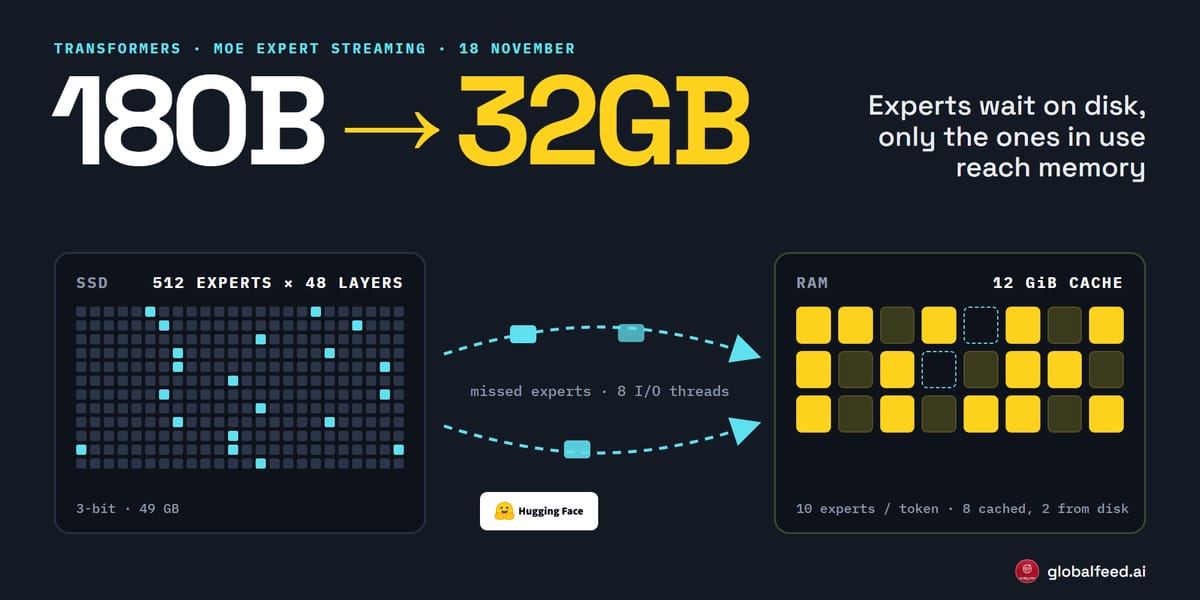
Qwen3.8-Flash-Next is an extreme case. Each of its 48 layers has 512 experts, and only 10 run for any token, less than 2% of them. The post says experts make up more than 90% of an MoE model's parameters. So most of the model does not need to sit in memory at every moment; only the experts the current token needs do.
Why streaming from the SSD works
The method is called expert streaming. The dense part of the model, such as attention, stays in memory. The experts wait on the SSD and are read only when needed, into a fixed-size cache in memory. When the router picks 10 experts, most are usually already cached; the missing few are read from disk into free cache slots. The post's figure shows one case: of 10 chosen experts, 8 are cached and 2 come from the SSD.
Two things make this practical. Consecutive tokens tend to pick similar experts, so the cache hits often. And the experts are shrunk so there is less to read: quantized to 3 bits, the 121 GB of FP8 experts become 49 GB on disk, with 12 GiB of them cached on the device. The dense layers take about 5.4 GB at 8 bits, which the post says raises perplexity by only 0.2% over BF16. A single expert is about 2 MB, so each read is short.
How it works, step by step
In the final version the cache is a slot pool: one preallocated block of device memory shared by all layers, plus a per-layer table mapping expert ids to slots. The router's expert ids are remapped to slots, so Transformers' existing grouped matrix multiply runs unchanged. An LRU rule decides which expert leaves the cache; Ziadé writes that no other policy beat LRU by much. Missed experts are read by 8 I/O threads, one contiguous read per expert, straight from offsets in the safetensors files, with the operating system's page cache bypassed where possible. When the SSD would otherwise be idle, the system reads one guessed expert for the next layer, which enters the cache only if it is used. During prefill, the next layer's experts are read while the current layer computes.
How to try it
The feature is not in a Transformers release yet; it lives in draft pull request #50717. You install the library from that branch, and the author shares converted files in a separate Hugging Face repo with the dense layers, the 3-bit experts and the model's 51 GB n-gram table. The post's example:
pip install "git+https://github.com/huggingface/transformers.git@refs/pull/50717/head"

path = snapshot_download("tarekziade/Qwen3.8-Flash-Next-expert-streaming")
model = AutoModelForCausalLM.from_pretrained(
    f"{path}/dense",
    dtype=torch.bfloat16,
    device_map={"": "mps", "experts.*": "disk"},
    quantization_config=MetalConfig(bits=8),
    experts_offload={
        "cache_bytes": 12 << 30,
        "quantized_experts": f"{path}/experts-q3",
    },
)
"experts.*": "disk" in device_map keeps the experts on disk, cache_bytes sets the cache size (12 GiB here) and quantized_experts points to the 3-bit expert files. The snippet omits imports, so add torch, snapshot_download and AutoModelForCausalLM yourself.
Hardware and speed
All measurements ran on the same 32 GB MacBook M5. After loading, the model uses about 18 GiB, peaking at 25.4 GiB on a 6,000-token document; the author had to close the browser to stop macOS from swapping. Generating 200 tokens, Transformers reached 13.9 tokens per second against Strata's 14.8. On a 4,000-token prompt, prefill ran at 228 tokens per second, slightly ahead of Strata's 220. After a 6,000-token document, decoding ran at 12.4 against 13.7. Before the optimizations these numbers were 10.0, 68 and 7.3. The post openly says that if the experts fit in RAM, llama.cpp is hard to beat. The gap appears when they do not: the classic Transformers and Accelerate offload copies every expert of every offloaded layer on each token and managed 0.16 tokens per second on a single 24 GB A10G. On a Mac, offloading to the CPU frees nothing, because memory is shared.
Limits and what comes next
This is a proof of concept. The pull request is a draft, written with AI help and not meant to be merged as is, and the API is still being discussed with the Transformers maintainers. For now it is tuned mainly for Apple GPUs (MPS), handles one request at a time and supports MoE models with the standard experts layout. Conversion takes about 5 hours, about 10 ms of Python overhead remains per token, and the author adds that 14 tokens per second is still too slow for the way the author uses coding agents. Even so, it brings an idea pioneered by Niko Veit's Strata into the library most developers already use. If it ships, a developer with a 32 GB laptop could try open models with hundreds of billions of parameters without buying new hardware.
Sources: Hugging Face blog, Transformers pull request #50717, Converted model repo, Strata