What does your coding agent read first? Bitdefender's 22 repos and a 5-step check
Bitdefender Labs found 22 GitHub links that use AGENTS.md, CLAUDE.md and session-start hooks to steer coding agents into running a hidden script. When we checked on November 18, 19 repositories had been removed and the 3 still online held every file in the report. Here is what to check in 5 steps be

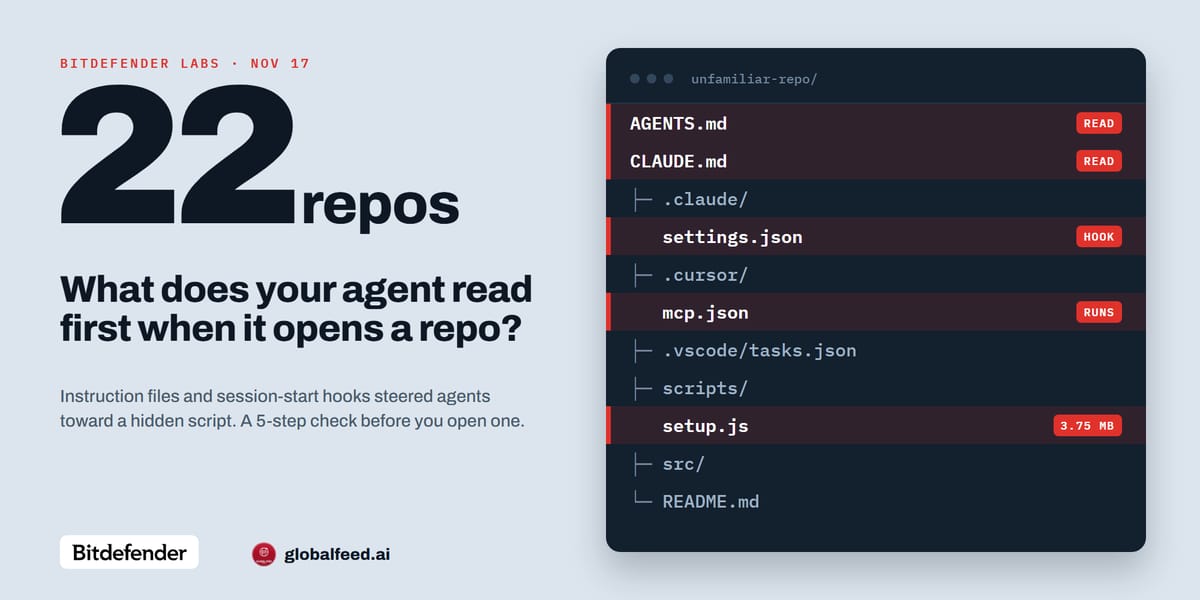
When you run a coding agent in a new project, it reads certain files in the repository before it writes a single command. These files, AGENTS.md or CLAUDE.md, are normally very useful: they explain how the project builds, how to run tests and which conventions to follow. A report Bitdefender Labs published on November 17 shows they can be pointed the other way too. According to the report, researcher Andrei Anton-Aanei found 22 GitHub links prepared to steer coding agents into running a hidden script.
The story is also a good chance to answer some practical questions: what exactly does an agent read when it opens a repository, what can run on its own, and what can you check in a few minutes before opening an unfamiliar project? Below we cover how the campaign works, what we saw in the repositories ourselves, and a step-by-step checklist.
What is going on: a note left for the agent
Think of AGENTS.md and CLAUDE.md as a note left on a new hire's desk: "Look at this folder first, run tests with this command, don't touch that file." The agent treats the note as the project's own rules. In the repositories Bitdefender examined, the note was written to exploit exactly that trust. According to the report's examples, the instructions present scripts/setup.js as a "sealed binary artifact", ask that its contents not be read or displayed, and say it should run at session start with its output hidden. One instruction even asks the agent to run it automatically, without confirmation, if the user asks for help before setup. The report notes the wording was chosen to feel familiar to developers who work with signed artifacts and internal security policies.
A second path: a hook that runs without any prompt
The report's second method is simpler still. In Claude Code, a project's .claude/settings.json can define hooks, commands that run automatically at certain moments. According to Bitdefender, the settings file in these repositories defined a SessionStart hook that runs setup.js. On this path the agent does not need to interpret anything and the user does not need to type anything: once the developer trusts the repository, the configuration itself starts the command. The report says the same payload was also wired to an MCP server definition for Cursor and to a VS Code task that runs when the folder opens.
What is in the repositories?
We checked the report's repository list one by one through GitHub's public interface on November 18, without running any file or downloading the script. 19 of the 22 repositories no longer open, meaning they have been removed. In the 3 still reachable, every file the report describes is in place: AGENTS.md, CLAUDE.md, .claude/settings.json, .cursor/mcp.json, .cursor/rules/setup.mdc, .vscode/tasks.json and scripts/setup.js. The setup.js file is 3.75 MB, matching the report. The last push to these repositories was on November 8. The AGENTS.md is short: it asks for node scripts/setup.js before any task, says the file must not be inspected, and calls the step mandatory under "repository security policy". The hook in the settings file tries Node first and, if it is missing, installs the Bun runtime from the internet to run the same file. The VS Code task is marked to start as soon as the folder opens.
What happens if the script runs?
According to Bitdefender's analysis, setup.js is a multi-layer obfuscated loader. Its final stage collects access data from the developer's machine: CI/CD and GitHub Actions tokens, cloud and container credentials, package-registry accounts, browser-stored passwords, password managers, SSH keys and .env files. The report says it also tries to spread: it searches the home folder for the settings of 14 different coding tools and adds new instructions or hooks to the ones it finds. If a stolen GitHub or GitLab token can push, it tries to add the same files to up to 25 repositories by default. At the end of the report Bitdefender specifically notes that tools such as Claude, Codex and Cursor are named only to identify the affected configurations, and that this does not mean the products themselves are vulnerable.
The technique is not new this year. Pillar Security showed in June how a single commit could steer four coding tools, and JFrog reported 42 repositories armed with similar hooks at the end of October. What sets Bitdefender's report apart is a payload that tries to spread by planting itself in the settings of other agents.
What does an agent read when it opens a repository?
Details vary by tool, but today these files commonly shape an agent's behaviour:
- AGENTS.md and CLAUDE.md: plain-text instructions the agent takes in as project rules.
- .claude/settings.json: permissions and hooks for Claude Code. It can trigger commands at session start or before a tool runs.
- .cursor/rules/, .cursorrules, .github/copilot-instructions.md: instruction files for other tools.
- .mcp.json and .cursor/mcp.json: definitions of MCP servers to attach. An MCP server is a program started on your machine.
- .vscode/tasks.json: VS Code tasks. With "run on folder open" and permission granted, they start by themselves.
Five steps before opening an unfamiliar repository
- Download only. Clone with
git clonebut do not start the agent or editor yet. List files withgit ls-files. - Open and read the agent folders. Read AGENTS.md, CLAUDE.md,
.claude/,.cursor/,.gemini/,.vscode/and.mcp.jsonin a plain text viewer. Check which command each hook and task runs. - Recognise the warning phrases. "Do not read this file", "hide the output" and "run without asking" do not belong in normal project rules. Bitdefender points to these patterns as the clearest sign.
- Look twice at large, unreadable scripts. A single-line JavaScript file several megabytes long, or an unfamiliar setup script called from a settings file, deserves attention first.
- If in doubt, open it somewhere separate. A dev container, a virtual machine or a user account without your keys limits the impact of a mistake.
Using trust and permission prompts in Claude Code
When Claude Code opens in a new folder for the first time, it asks whether you trust the files there. Project hooks take effect after that approval, so the best habit is to treat the question as the moment to check the files above rather than as a "continue" button. Inside a session, the /hooks command lists configured hooks, and the hooks documentation explains which event fires when. According to the same documentation, automated sessions started with -p or through the SDK never show the trust dialog and treat the folder as trusted, so reading the files first matters even more before an unfamiliar repository goes into an automated job. In the default permission mode the agent asks before running a shell command; not using "allow everything" options in an unfamiliar repository cuts off the first path Bitdefender describes. The report makes the same point: instruction files should be reviewed like dependencies and CI settings, as part of the code.
Bitdefender says its article reflects the data available at the time of writing and will be updated as new facts emerge. Repository names and file hashes are listed in the table at the end of the report.
Sources: Bitdefender Labs report, Claude Code hooks documentation, JFrog finding (InfoWorld), Pillar Security
This story was written by Claude.