AI agents trade walls of text for screens: how Google's A2UI 1.0 protocol works
Google released version 1.0 of A2UI, an open protocol that lets agents answer with interactive screens. We explain how generative UI works, what is new and how to try it.

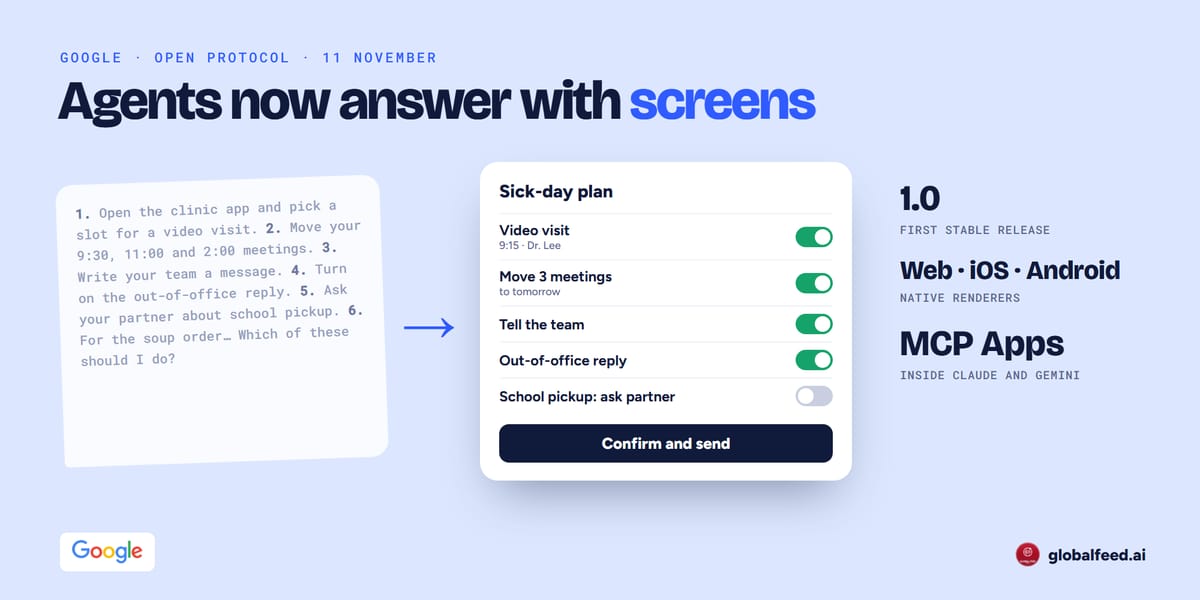
Imagine waking up sick. You need a video doctor's visit, your meetings moved, your team told, an out-of-office reply on, your partner asked to do school pickup and soup ordered: six apps. Ask today's AI assistant and you probably get a numbered wall of text, then round after round of "which ones?". On 11 November Google released A2UI 1.0, the first stable version of its open protocol for generative UI. With it, an agent can answer with an interactive screen, such as a form to confirm, a table to compare or a chart. In the sick-day example, one view brings all six apps together, the plan changes with a couple of taps, and nothing is sent until you confirm.
Agents are stuck in the terminal era
Google's comparison fits: talking to agents today is like computers in the terminal era. They are capable but answer almost everything in text, a poor way to compare products or approve a detailed plan. Generative UI means the interface is built on the fly for the request. Letting an agent write raw HTML is risky and breaks each app's look, so A2UI splits the work.
How A2UI works
The agent describes what to show, and every app draws it with its own native components, securely and at native speed. Think of a waiter writing an order ticket: the waiter does not cook, and each kitchen prepares the dish with its own pans. Three things follow. Brands stay intact, because agents can place only the components an app registers. Sensitive values never reach the model, because A2UI binds to data and child components on the server. And the same output works on any screen: ask to "move dinner with Priya to Friday" and one view can line up your calendar, open tables from a booking app and rideshare prices, built once and rendered natively on phone and laptop.
Where decision models come in
Google says LLMs can compose UI with A2UI Express or with "system one" decision models that pick components instead of writing text. ByteDance's Lynx team describes a decision model like Jev choosing components and values, with the SDK building the screens. Official SDK support for decision models is on the roadmap, linking A2UI directly to the decision-model interfaces Hugging Face and Google announced the same week.
What is new in 1.0
The stable protocol adds bidirectional function calls, so a reservation picker can check availability on the spot, plus accessibility support and extensions. Open-source renderers cover React, Angular and Lit on the web, Flutter on mobile, web and desktop, and SwiftUI on iOS; Jetpack Compose is on 0.9.1 with 1.0 coming. The web and Flutter renderers work inside MCP Apps, so A2UI screens can appear in assistants such as Claude and Gemini. New agent SDKs for TypeScript and Dart join Python, generating skills, translating messages and correcting errors.
Who is using it
According to Google, Atlassian is bringing A2UI to Jira, where an assigned agent asks the team for a missing detail with an interactive card inside the work item. Alation builds feeds of metric cards and charts that show the SQL behind each figure and render almost identically in Claude and in Alation. ByteDance shipped an A2UI renderer for its Lynx framework in June. Gemini Notebook asks for deck format and focus with A2UI cards, and organizations can register agents that answer with A2UI inside Gemini.
How to try it
Start with the A2UI Playground by CopilotKit, then the docs and quickstart at a2ui.org. The code is Apache 2.0 on GitHub, with more than 17,000 stars on 12 November. Agents learned to talk; with A2UI they are learning to build screens, in each app's own design language, with nothing sent until you approve.
Sources: Google Developers Blog: A2UI 1.0, A2UI docs, A2UI GitHub