Ask your coding agent to “set up a GitHub MCP”: which server does it install?
Glow Labs' MCPhantom research shows coding agents sometimes recall archived MCP servers from training data and install them. What MCP is, why it happens, the flaws found and the steps you can take today.

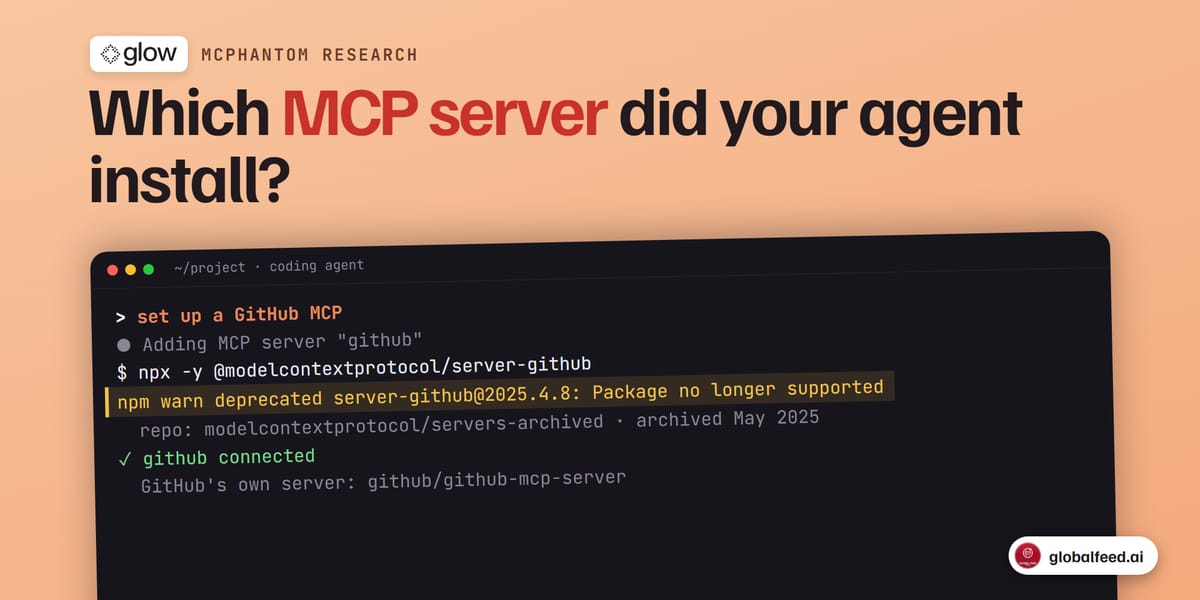
A developer types one line to their coding agent: "Set up a GitHub MCP for me." Within seconds the agent fills in the config file, runs the command and the connection is ready. Everything looks fine. Glow Labs, the research team at security company Glow Security, found real sessions where this scene had a different ending: instead of the official server GitHub maintains today, the agent had installed an old package that has sat in an archive since May 2025 and no longer gets updates. The team named these retired servers, quietly coming back onto developer machines, MCPhantom.
The good news is that both the cause and the fix are clear. According to Glow, none of these sessions involved an attacker; the agent was simply working from what it knew on the day it was trained. Checking which server got installed and pointing the agent at the right package takes a few minutes. Below we explain what MCP is, why agents pick the old package, which flaws turned up in the archived servers and what you can do today.
MCP and the reference servers that retired
MCP (Model Context Protocol) is a shared language AI agents use to connect to outside services. Think of it as the socket on an extension cord: a small program written for GitHub, Slack or a database, the "MCP server", lets the agent read files, open issues or run queries in that service. Most of these servers run on the developer's own machine, and they are often downloaded from npm and started on the spot with an npx command.
When Anthropic introduced MCP in 2024, it published 20 example servers (reference servers) to show developers the way. According to Glow's write-up, as GitHub and other services shipped servers of their own, 13 of those examples were archived, which Glow describes as a normal part of a maturing ecosystem. The archive repository, modelcontextprotocol/servers-archived, has been closed since May 2025. Its notice says no security guarantees are provided, no updates or bug fixes will come, and current servers live in the active repository. The current GitHub server is github/github-mcp-server, maintained by GitHub itself.
Why the agent picks the old package
A language model's knowledge freezes on the day it is trained. Picture a courier who knows the old address of a shop that has moved: the sign is familiar, the door is still open, but the owner has not been in for years and the locks were never changed. The courier does not know the new address, so they take you to the old one. In 98% of the sessions Glow Labs reviewed where a deprecated server was installed or suggested, the agent appears to have filled in the package name from the model's training data. In the other 2%, the user asked for the old package by name and the agent obliged.
The flow is the same every time. The developer wants to connect a service, the agent writes the name of an early reference server it remembers from training, then either fills in the config itself or hands the developer the command, and npm installs the deprecated package. According to Glow, the pattern showed up in every tool and with every model provider in its data: Claude Code, Cursor, Codex CLI, Claude Cowork and Claude chat, and models from Anthropic, OpenAI and xAI. So a fix from any single vendor would not close it on its own.
Part of the story comes from npm itself. A deprecated package drops out of npm search, yet npx still installs it with nothing more than a warning. Glow researcher Nadav Claude Cohen told Help Net Security that in one session the agent checked the package on npm, got back "This package is deprecated", installed it anyway and never told the user. Ophir Arie, Glow's co-founder and VP of R&D, sums it up as the model's memory turning into a package manager with no deprecation feed.
Four flaws in the archived servers
The team then examined what the agents had installed and found four high-severity vulnerabilities in these original reference servers. The most serious is in the Puppeteer server, which lets an agent drive a browser. As Glow describes it, an instruction hidden in a web page (prompt injection) can make the agent start any other program on the machine instead of the browser and run whatever command the attacker chooses. The developer only allowed the agent to browse the web, but in the eyes of the agent harness that one permission covers the rest.
Glow reported the flaw through HackerOne on 30 July 2026 and filed a GitHub advisory. HackerOne closed it as out of scope and pointed to GitHub. Between 4 and 11 October all four flaws went to Anthropic's CVE Numbering Authority (CNA). The maintainers closed the advisory, saying the server was archived in May 2025 and is unmaintained, so no fix or release will come from that repository, and said they would look at marking the npm package deprecated so users are warned. As of 5 November, the latest versions of server-github and server-puppeteer on npm carry a "no longer supported" notice. Glow says it has not seen these flaws exploited so far.
The packages are still in heavy use. By Glow's count, the archived reference servers have been downloaded from npm 17,352,267 times since 10 July 2025, and five of them sit in npm's top 100 MCP packages. According to Cohen, server-github alone had 185,239 downloads last week. npm lets an owner remove a package only if it had fewer than 300 downloads in the past week, has a single owner and no public dependents, so pulling the packages is not a practical option either.
| Archived package | Downloads since 10 July 2025 |
|---|---|
| server-github | 5,266,085 |
| server-postgres | 4,312,874 |
| server-slack | 3,198,630 |
| server-puppeteer | 1,487,526 |
| server-brave-search | 1,461,811 |
| Total (12 packages) | 17,352,267 |
Why security tools miss it
These servers are dependencies that never appear in a dependency file. Endpoint protection (EDR) sees a trusted Node process install a public npm package at the agent's request and treats it as routine. Dependency scanners (SCA) read project manifests, but a server launched with npx sits in no manifest, and the flaws have no CVE numbers. Software inventory does not record it as an installed application either, because the server runs inside a Node process. According to Glow, the one place the issue shows up is the developer machine, where the agent writes the config and runs the install.
What you can do today
The steps Glow recommends need no extra tools, and they work for a solo developer as well as a large team.
- Give the agent the full package name. Writing "install github/github-mcp-server" instead of "set up a GitHub MCP" keeps the agent from reaching for the old name in its memory. You can look up current servers in the official MCP Registry.
- Check what is already installed. Search your agent tools' config files for the archived package names: ~/.claude.json and the project's .mcp.json for Claude Code, ~/.cursor/mcp.json for Cursor, ~/.codex/config.toml for Codex CLI, and claude_desktop_config.json for the Claude desktop app. Replace any match with the service's own server.
- Ask about status before installing. The npm view command prints the deprecation notice if a package has been deprecated.
- Approve one server per service across the team. Glow recommends choosing a single approved server for each service and adding npm deprecation status to the approval criteria.
- Use pre-execution hooks. According to Cohen, many agent harnesses already support hooks that run just before a command executes, and stopping old package names there works today.
Example commands for searching and checking (on Windows, run them in Git Bash or WSL):
grep -rnE "@modelcontextprotocol/server-(github|gitlab|slack|postgres|puppeteer|brave-search|google-maps|gdrive|redis|aws-kb-retrieval|everart)" \
  ~/.claude.json .mcp.json ~/.cursor ~/.codex 2>/dev/null

npm view @modelcontextprotocol/server-github deprecated
Some reference servers published under the same @modelcontextprotocol name, such as Filesystem, Memory, Everything and Sequential Thinking, are still maintained; they live in the active repository and are not on the list above.
For a lasting fix, Cohen names four parties. Harness makers could refuse deprecated servers or warn the user, but it only works if every harness does it. Model makers could update the package names their models know, though that is expensive. Package owners could fix the bugs, the only fix that protects people who keep using these servers. And security companies can step in today through the hooks agent harnesses already offer.
The findings rest on session transcripts Glow Labs reviewed itself; the write-up does not say how many sessions were examined, and the 98% figure is calculated only within sessions where a deprecated server was installed or suggested. Glow sells a product that monitors AI tools on developer machines and promotes it at the end of its post; the steps above do not require any product. For a fuller picture, follow evaluations from independent researchers as well.
Sources: Glow Labs MCPhantom research, Archived MCP servers, GitHub MCP server, MCP Registry, Help Net Security