Merged the pull request? What Google's new Stitch Loop agent does after launch
Google Labs' Stitch Loop connects to your codebase and live product data and keeps working after launch. We walk through its four steps, the built-in security, latency and accessibility loops, and the waitlist.

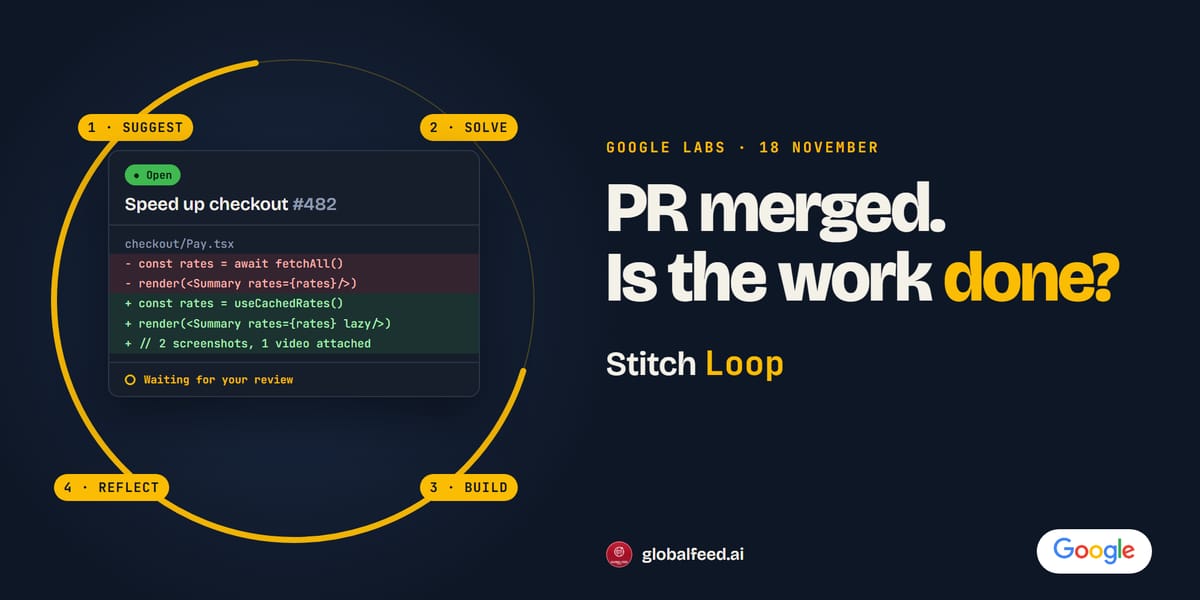
Ask a coding agent to add a discount code field to your checkout page. It writes the code, you review it, the pull request merges and the feature ships. That is where the agent's job ends, and where most of a product's long work begins: patching vulnerabilities, speeding up slow pages, finding out why people quit halfway through signup. Google Labs, with Stitch Loop announced on 18 November, is trying to put an agent on that second half. Google describes it as a long-running product agent that connects to your codebase and live product data and keeps working around the clock until your goals are met.
Stitch itself has been Google Labs' tool for turning an idea into a working interface in minutes, and Google says millions of designers, developers and founders use it. Stitch Loop is an experiment and, in Google's words, part of a new direction for Stitch. Here is how the loop works, what the three built-in loops do and how to join the waitlist.
Three ideas first: pull request, sandbox, MCP
In software teams, changes rarely go straight into the main code. A developer prepares them on a separate branch and opens a pull request (PR) on GitHub, a proposal that says "I want to change these lines in these files". A teammate reads it, asks for fixes if needed and approves the merge. Every Stitch Loop suggestion arrives the same way; Google says you always have the final call and nothing merges until you review the PR. The agent writes that code in an isolated cloud sandbox, a temporary environment separated from your machines and your live servers. And MCP is a common protocol AI tools use to connect to outside services, which Stitch Loop can use to reach your own data sources.
Setting up a loop
You start by connecting GitHub, where the agent reads code and opens PRs, and your product context: logs, user behaviour and feedback. Google offers more than 180 integrations, custom MCP servers and local CLI uploads for this. Loops are "evergreen": they stay open around a measurable goal instead of closing like a one-off task. Three come by default and you can add your own at any time, such as Google's example of improving checkout conversion.
Four steps: suggest, solve, build, reflect
Every loop repeats the same four steps. First, the agent surfaces opportunities toward your goal, grounded in evidence from your product, such as a signup field where many users drop off. Second, each suggestion comes with one or more solutions, each with its tradeoffs and scope, plus visual design options when the change is in the interface. Third, once you choose a direction, the agent builds it in the sandbox and opens a PR for your approval, with screenshots and videos of the work when relevant. Fourth, after the change ships, it watches live product data, learns from what worked and what did not, and sharpens the next round. When a goal is met it keeps watching, ready to act if the metric slips.
The built-in loops: security, latency, accessibility
The security loop is the one Google describes in most detail. It pairs the cybersecurity capabilities of Gemini 4 Carbon with CodeMender, Google DeepMind's autonomous agent for improving code security. Together they scan your codebase for vulnerabilities before they become incidents, flag each issue with evidence and open a PR with a proposed fix for your review. The latency loop targets how long users wait for a response, and Google lists speeding up checkout among the typical post-launch jobs. The accessibility loop aims at making the product usable for people with visual, hearing or motor impairments. Google names these two loops without describing their inner workings yet.
Working with other agents and Slack
According to Google, coding agents such as Antigravity can pull persistent product context from Stitch Loop through the Stitch CLI and MCP, so the agent writing your next feature knows where the product is struggling. Teams can also type @stitch in Slack to get daily insight digests and start new loops.
The waitlist
The Stitch Loop waitlist opened on 18 November for all users worldwide, with priority access for eligible Google AI Ultra subscribers. Feedback goes through the Google Labs Discord. The announcement does not give pricing or a date for access. Google frames the tool as a step toward agents that help lean teams, which makes startups and small software teams without dedicated security, performance and accessibility staff the natural audience.
The promise is a helper that stays on the product after launch, while the decision stays with people: the agent suggests, lays out options and prepares code, and a teammate still presses merge. Stitch Loop is a Google Labs experiment for now, and how it holds up on real products will show as users try it. For a fuller picture, follow evaluations from independent developers as well.
Sources: Google blog announcement, Stitch Loop waitlist