Fixing a video by talking to it instead of starting over: how to try Gemini Omni 1.2 Flash
Google's Omni 1.2 Flash generates up to 15 seconds of video in one go and lets you edit the same clip turn by turn in conversation. What changed, what it costs and how to try it.

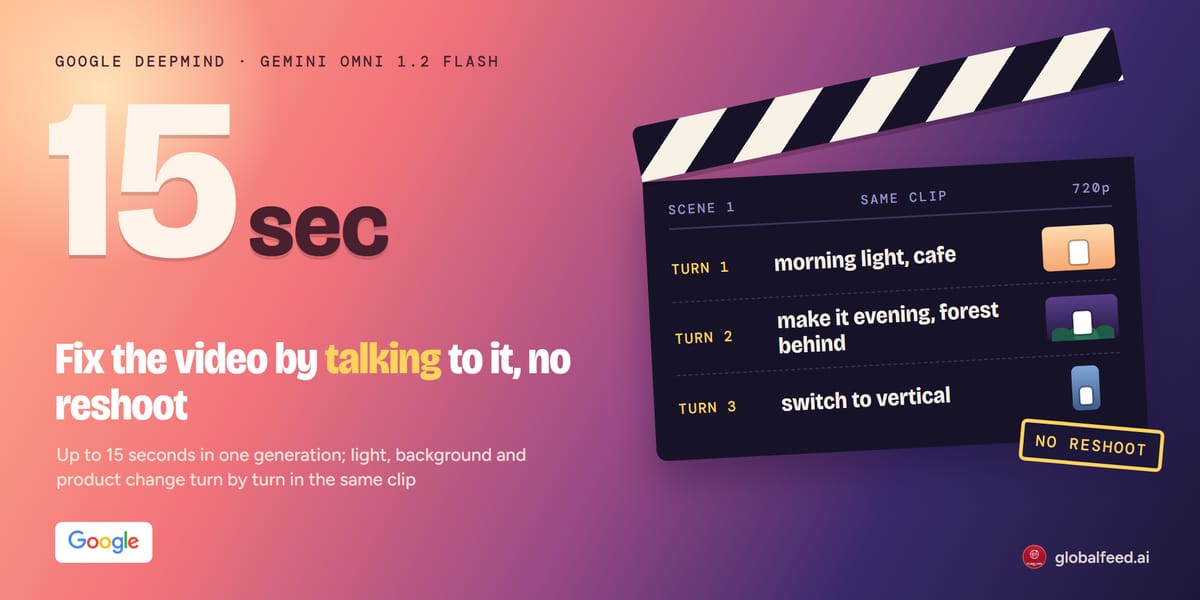
Picture an ad: the product sits on a table, morning light, a cafe in the background. The client watches and says, "same scene, but make it evening, and put a forest behind it." That sentence used to mean a new shoot day. With AI video it often meant generating the scene from scratch and leaving everything you had nailed to chance again. Gemini Omni 1.2 Flash, which Google announced on November 5, turns that request into the next line of a conversation: you go back to the same clip and ask it to change the light, the weather, the product or the background, and the characters and camera move stay in place.
Omni is Google DeepMind's model for generating and editing video with sound from text, images and video. We covered version 1.1 on August 27; it generated up to 10 seconds at a time and could extend a scene in 10-second steps up to 40 seconds. In 1.2 a single generation goes up to 15 seconds. According to Google, this is the first time Omni is generally available: the model is now offered in the Gemini API and on Google Cloud, backed by Google Cloud's enterprise infrastructure and security.
What changed
15 seconds in one go. Duration can be set second by second from 3 to 15 seconds, long enough to finish a product explainer or a social ad in a single generation. The developer documentation says the model defaults to 10 seconds if no duration is set. Existing clips can also be extended by 3 to 10 seconds per turn, up to 30 seconds in total. First-and-last-frame interpolation, where you supply the opening and closing frames and let the model fill the transition, works from 3 to 10 seconds.
Editing in conversation. You can refine a clip turn by turn: swap the product or the background, change the lighting or weather, switch the aspect ratio to vertical. In Google's example, the background of one clip changes over five turns from a pavilion tent to an oak forest, a stable, a market fair and a stone castle, while the two characters' performances, the reflections on their armor and the camera framing stay intact. It works across full 15-second clips.
Closer to the references. Character, product or style images, short motion clips of up to 3 seconds and audio cues can be combined. The documentation allows up to 6 reference images. Faces, garments, packaging text and brand colors hold across camera angles. In one example, a single model photo plus front and back shots of three outfits become a 15-second virtual try-on, with each garment's cut, drape and back details consistent through the turns.
More natural speech. Multiple speakers can be directed separately, and lip-sync is clearer. In Google's example, images of four characters and one-second voice samples route each voice to the right character. On the camera side, long continuous moves, such as a single drone flight from a piazza up to the oculus of a dome, come out without unwanted jump cuts.
What it costs
According to Google's pricing page, as of November 5 a second of 720p video costs about $0.07: roughly $0.70 for a 10-second clip and $1.04 for 15 seconds. That is 30% below the 1.1 price for 720p. A 360p draft is about $0.023 per second, upscaling to 1080p $0.104 and to 4K $0.209. Google's suggested workflow keeps costs down: draft fast at 360p or 720p, fix details with an edit instead of regenerating the whole clip, and upscale the best result to 1080p or 4K at the end. The pricing page says that from December 3, all API requests to 1.1 will route to 1.2 automatically and be billed at the new rate.
How to try it
Developers can try the model in Google AI Studio; in the API it is gemini-omni-1.2-flash, available on the paid tier of the Gemini API. Without code, Flow lets you direct scenes and edit turn by turn. In Google Vids, 15-second clips can be generated at no additional cost with a Google account or Workspace subscription. 15-second video is rolling out to Google AI Ultra subscribers in the Gemini app, and the model also powers video campaigns in Google Ads.
The documentation's advice for good results is simple: describe the scene, camera movement, lighting and mood in detail, and explain how the subject moves and where the camera goes instead of writing a vague "make it move". English is fully supported; other languages have not been evaluated yet, so prompts in other languages may work but results can vary.
A few limits are worth knowing. Google says work continues on fast sports action, rapid script changes and complex physics. The current API version does not accept uploaded audio. Editing or extending user-uploaded video is not yet available in the European Economic Area, Switzerland and the UK. Every generated video carries an invisible SynthID watermark that software can detect. The announcement describes companies such as Adobe, Figma Weave, Magnific and Whering using the model in their tools; Google did not share speed figures or benchmarks, so your own tests will show the quality difference best.
Sources: Google: Gemini Omni 1.2 Flash announcement, Gemini API: Omni Flash docs, Gemini API pricing