Build your own DeepSeek app: search, file reading and voice now come through one API
DeepSeek opened its app's search, link and file reading, safety and voice features to the API. Here is how it works and how to set it up.

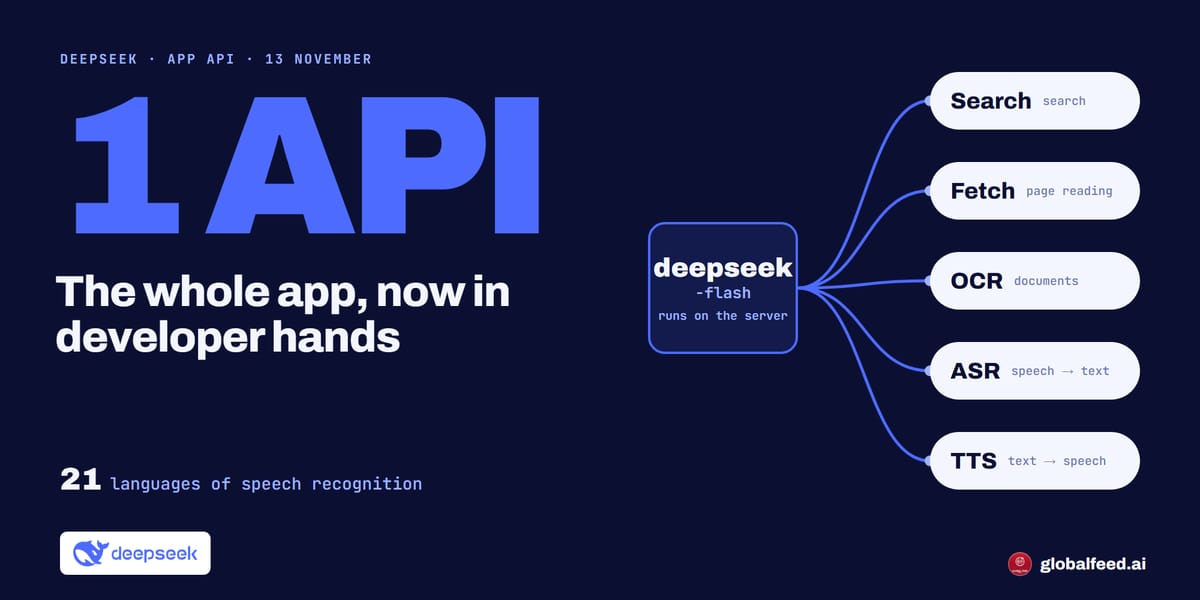
Ask a chat app what happened in the markets today and much more than a model is at work. The app searches the web, opens a few pages, adds citations, turns your PDF into text, transcribes your voice and can read the answer back. On 13 November DeepSeek opened all of those pieces to developers: the search, file reading, link reading, safety checks and voice features of the DeepSeek App now come through the API.
Server-side tools, in plain terms
A language model cannot look at the internet on its own. Usually the developer writes the tools: the model asks for a search, the developer's code runs it and hands the result back. In DeepSeek's new setup that loop runs on DeepSeek's servers. The developer only switches tools on; per the docs, nothing runs on the client.
What is included
Inside chat: deepseek_web_search for cited answers (including image search when the message has images), deep search with thinking on (up to about 20 tool calls before answering, per the docs), deepseek_read_url for links in the last user message, file input for PDF, Office and images, and a safety_check parameter that DeepSeek says public apps must enable. Standalone endpoints cover Search, Fetch, OCR, ASR and TTS.
The ASR service recognises 21 languages, including Turkish, Arabic and Chinese, detects the language itself and takes up to 120 seconds per file. TTS offers two voices, stella and tide, in 10 languages, either as a single request or streamed over WebSocket while the model is still writing.
Prices and model
As of 13 November, per the pricing page: search and fetch cost $0.75 per 1,000 requests, OCR $0.225 per 1,000 pages, ASR $0.058 per hour of audio and TTS $0.225 per 10,000 characters, the last two with a limited-time 50% discount. Fees come on top of token charges. Everything runs on deepseek-flash, the open V4.1-Flash model introduced in September; the search, speech and voice services are hosted. The API speaks Anthropic Messages, OpenAI Responses and Chat Completions.
How to try it
DeepSeek also released an MIT-licensed chat demo that keeps the key and chats in the browser. Following the guide: get a key and point the client at https://api.deepseek.com with model deepseek-flash; add both web tools; set safety_check to high and enable title; render thinking, search cards and cited text; send earlier assistant blocks back unchanged next turn; upload files to /files and call ASR and TTS for voice. Locally the demo runs with pnpm install and pnpm dev. Figures here come from DeepSeek's own documentation.
Sources: DeepSeek announcement, Build a chatbot guide, Web tools docs, ASR docs, TTS docs, Pricing, chat-demo on GitHub